So it's 2026 and everything is ❤️🔥. Your team is using agents to develop code but everyone's stack is just so different. Thoughtworks woke up and dropped devcontainers on their radar and you're curious if it'll help you solve all your problems™.
But then you think about it and some problems pop up.
- Your company's front-end website is written in Typescrypt but your back-end is written in Python.
- You have a non-trivial number of libraries and services (honestly, any number >2 ) and imagining the headache of keeping
devcontainer.jsonandDockerfilesin sync. - You spent a week hardening your CI systems because of the Axios or LiteLLM supply chain compromises.
- Building a Dockerfile can take a lot of time! Obligatory "Compiling" xkcd comic.
Luckily there are solutions! Not one solution (because that's not how reality works) but by thinking about our development environments like our production systems we can move from "cool idea" to "this could actually work!".
Baking 🍪s (and Dockerfiles)
The docker bake command lets us define Docker builds using YAML (🤮) or HCL (🔥). HCL allows us to manage builds and build definitions more like code than configuration. It also lets us support common, real-world situations like developers using M chips but CI/CD running on AMD CPUs by making multi-architecture builds easy.
 ivanklee86
The docker bake strategy can scale from personal use to relatively large companies (tens of teams, 100+ developers). Even so, it's important to think through how we build our Docker images.
- Pick tools that don't have too many dependencies - Tools that publish standalone binaries in Docker images are the gold-standard! They are easy to version, reduce image bloat, and save compile time.
COPY --from=golangci/golangci-lint:v2.11.4 /usr/bin/golangci-lint /usr/local/binSaved a LOT Of bloat and build time
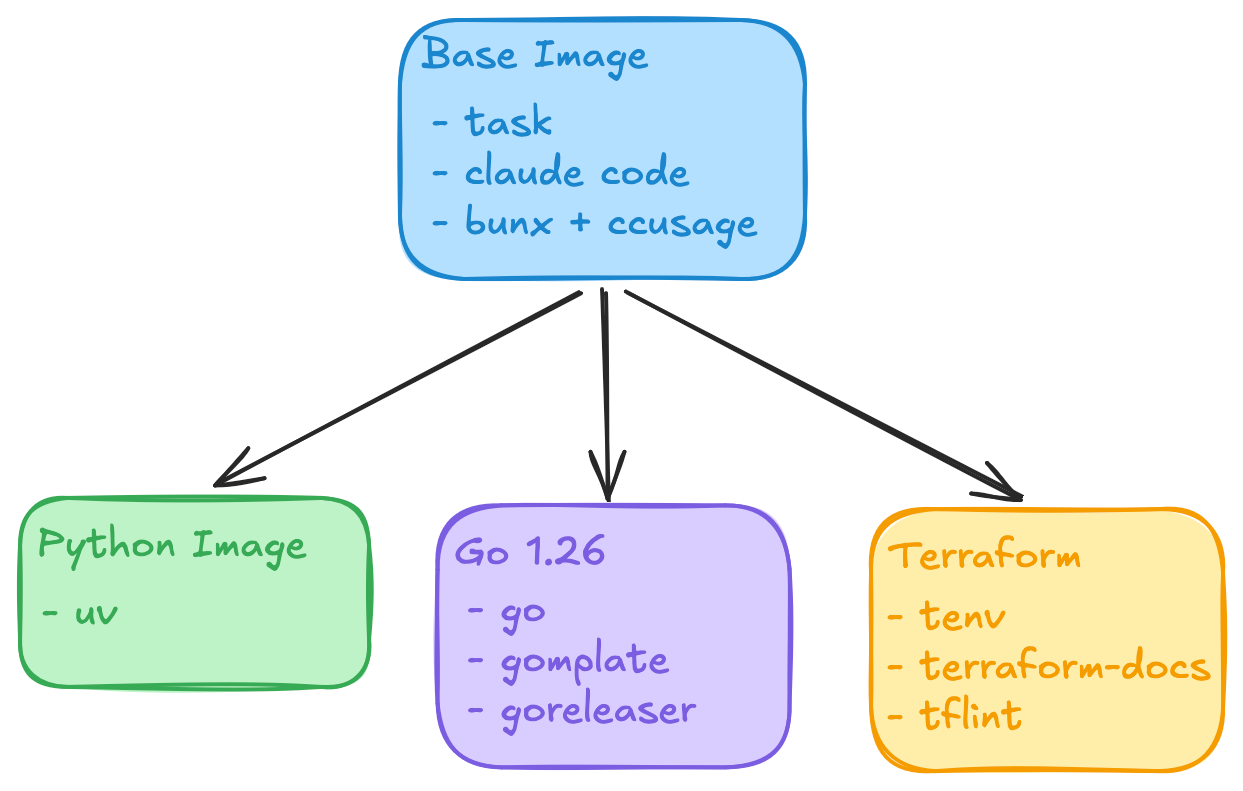
- Build standard tooling into a base image - The
baseimage is a great place to standardize generic tools like task runners (taskfiles being a personal favorite), utilities (prek is awesome since it's lightweight and fast), and AI coding agents likeclaudewith their groupies like ccusage. - Version your tools but update regularly with Renovate - This guards against supply chain attacks while maintaining a forward-looking toolchain for your developers. I highly recommend following Renovate best practices like grouping updates and having reasonably long cooldown windows.
- Rebuild your base images on a regular basis - This pulls patches and fixes from upstream, official development container images.
Well-maintained, shared Docker images address many of initial bumps and bruises that slow adoption.
- Development environments start up quickly! I've seen startup times shrink from 5-6 minutes to 1-2 minutes.
- Run the same images locally and in CI! Pre-built images is another tool in combating "Why doesn't it work in CI?".
- Balance best practices against team autonomy. A centralized language devcontainer lets you standardize toolchains. Teams who need other tools can extend the pre-built devcontainer in a repository or by adding another Docker image to the
docker-bake.hcl.
The Trickier Bit: devcontainer.json
So you're happily building your devcontainer images now. Hooray! The other half of the devcontainer standard is the devcontainer.json file which defines how your IDE is configured. This is very powerful feature that can supercharge developer experience. Do all your Python teams use ty? You can configure VSCode with the ty-vscode extension!)
However! Sharing and maintain devcontainers.json files over months (and years!) is a more difficult problem.
- If you are running Backstage or another scaffolding system, you can template out a
devcontainer.jsonwhile bootstrapping a repository. But this doesn't address drift over time. 😢 - git submodules for your
.devcontainerdirectory. But then you have git submodules! 😭 - Build a workflow or agent to sync configuration across repositories. Ai WiLl FiX tHiS. 😕
We ideally want a distribution method that:
- Allows us to maintain configuration in a git repository so we can leverage all the normal CI processes (reviews, history tracking, tagging, etc.).
- Lets developers customize on a repository and team level.
- Has a predictable, well-understood upgrade process.
In my day job, we use the jsonnet configuration language with tanka to standardize Kubernetes manifests for hundreds of microservices (and a few macroservices). Jsonnet is a DSL for managing JSON configuration with some (Python-inspire) programatic features. Could that be an answer? 🤔
I'd like to introduce folks to the gantry CLI! It's a Go CLI that addresses devcontainer.json distribution challenges for engineering teams.
 ivanklee86
You can define a configuration file like the following in your repository. Configurations are loaded from git repositories and the ref field enables use of Semver tags and Custom Managers in Renovate for a measured upgrade process. Overlays and files are processed in order. Since this happens one file at a time, it's easy to troubleshoot any issues that might happen!
version: 1

output_path: devcontainer.json

overlays:
  - repo: https://github.com/ivanklee86/devcontainers
    ref: main
    files:
      - devcontainer_configs/bases/go/devcontainer.json

  - repo: "."
    files:
      - extension.jsonnet
Example configuration
The extension.jsonnet contains a simple change that adds a custom extension.
{
  customizations+: {
    vscode+: {
      extensions+: [
        "DavidAnson.vscode-markdownlint",
      ],
    },
  },
}
If you don't pass a --write flag, gantry will output the result.
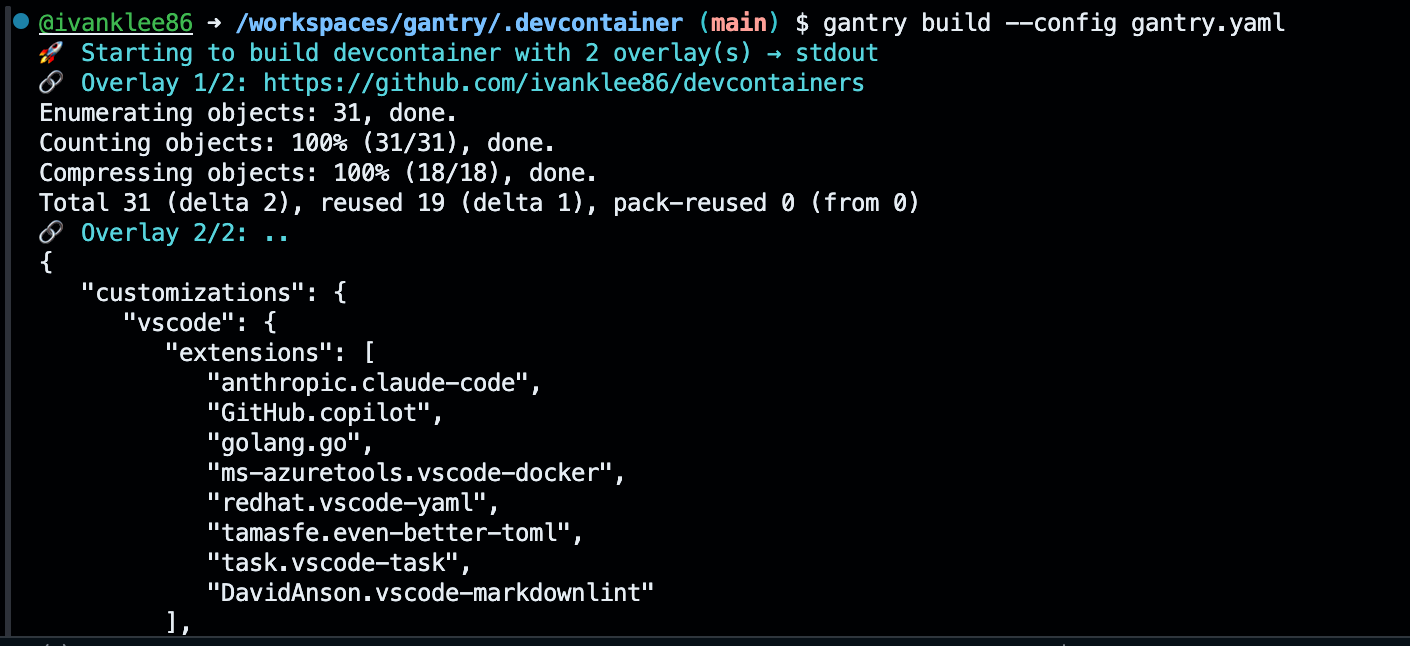
If you do, gantry will write the result to a file.